Introducing Bay Area Meshcore Health Check
If you’ve ever sent a message out into the Bay Area mesh and wondered “did that actually go anywhere?” — we’ve got you covered. We just launched our Meshcore Health Check, a new tool that tells you exactly how far your node’s messages are reaching, in real time.
You can try it right now at healthcheck.bayareameshcore.org.
What it does
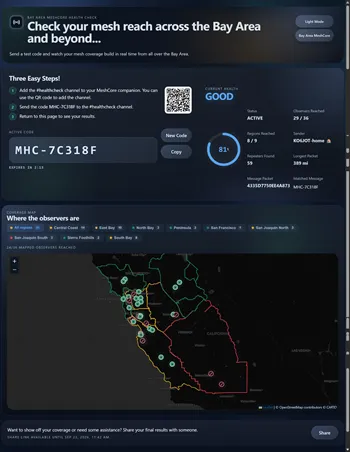
Health Check generates a short, unique test code for you to send out over MeshCore. Once you broadcast that code to #healthcheck, our network of observers listens for it, and the dashboard’s map lights up live as each observer reports back that it heard your message.
Instead of guessing whether your repeater placement, antenna, or path settings are actually working, you get a real answer: which observers received your test code, how many hops it took, and how coverage looks across the region — all updating in front of you instead of buried in a log file.
This is the same kind of coverage-verification tool that regional meshes like Greater Boston, Chicago, and Colorado Mesh have rolled out for their own communities, and we wanted the Bay Area to have one built around our own observer network and geography.
Where we’ve taken it a step further is in how results are shown. Rather than handing you a raw list of observer IDs you’d need to look up to make sense of, Health Check groups results by region — so you can see at a glance whether your message reached the Peninsula, the East Bay, the North Bay, or even further out into other parts of California, without needing to know the location of any individual observer. It turns a wall of anonymous callsigns into an actual map of where your signal traveled.
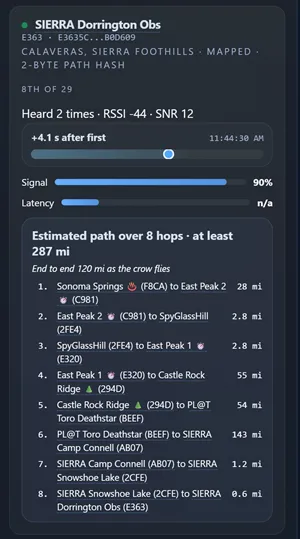
The map view is intentionally simple: zoom out and you get a clean regional picture at a glance. But the detail is there when you want it — click into any region or observer and you’ll find hop counts, timestamps, and signal-path breakdowns, so casual users get an instant read on their coverage while anyone who wants to dig deeper into the analytics can do that too.
Every result also gets a shareable link, so you can post your run and show off just how far your node reached — or hand it to someone helping you troubleshoot a weak spot in your coverage.
Why we built this
Bay Area MeshCore has grown fast — new repeaters going up on rooftops and hilltops across the region, more companions joining every week, and coverage that’s starting to genuinely stitch together across the Peninsula, the East Bay, and the North Bay. That growth is great, but it also makes “is my node actually reaching anyone?” a much harder question to answer just by eyeballing the live map.
A test message with no feedback loop doesn’t tell you much. The Health Check closes that loop: send a code, watch who hears it, and get a concrete signal for whether a new repeater helped, whether an antenna change mattered, or whether there’s a coverage gap in your part of the mesh worth solving with another node.
How to use it
Head to healthcheck.bayareameshcore.org from your browser.
-
Generate a test code.
-
Send that code as a message in #healthcheck channel from your MeshCore device.
-
Watch the dashboard as observers report back in real time, showing which parts of the mesh your message reached.
No account, no setup on your device — just your existing MeshCore client and the public #healthcheck channel.
A tool for the whole community
Whether you’re troubleshooting a repeater that just went up, deciding where to place your next node, or just curious how far your little windowsill companion can talk, Health Check gives you a fast, concrete answer instead of a guess. It’s another piece of the toolkit alongside our repeater setup guide, companion setup guide, and recommended devices list — all aimed at making it easier to build real, verifiable coverage across the Bay Area.
Give it a try, send a test code, and let us know what you find. And if you spot a gap in coverage near you, that’s exactly the kind of thing a new repeater — or a well-placed antenna — can help fix.
Questions or feedback? Find us on Bay Area MeshCore Discord or sent a message in the community channels.